


In the ever-evolving landscape of technology, smart displays are at the forefront, ushering in a future that is both innovative and immensely practical. These voice-activated devices are not only designed to simplify your home automation but also to enhance your daily living experience. Imagine having a central player that streams your favorite shows on YouTube, provides real-time maps, and manages your smart home–all within reach of your voice commands.
- Seamless integration with smart home devices lets users control lights, locks, thermostats, and cameras from one central display.
- Visual touchscreen enhances functionality over speakers by showing recipes, calendars, video feeds, and streaming content.
- Voice assistants like Alexa, Google Assistant, and Siri enable hands-free tasks, reminders, and quick information retrieval.
- Family communication features include video calls, shared photo albums, and synchronized reminders for household coordination.
- Fitness and entertainment support provide workout tracking, streaming services, and multimedia playback for versatile daily use.


Smart displays have been created to connect seamlessly with your android devices, allowing you to navigate your subscriptions and smart home settings effortlessly. They’re designed to respond to your commands, providing data for fitness, productivity, and even entertainment at your fingertips. Whether it’s locking your doors or adjusting the lights, these devices automatically cater to your needs while keeping a sleek design that fits perfectly into any room.
As we move further into the technological industry, it’s essential to understand the value that smart displays bring to our lives. They don’t just make tasks easier; they also require less time and effort from us, allowing for longer, more productive days. Priced competitively, they make smart living available for everyone. Now is the perfect time to find out how these devices can be a powerful addition to your home, helping you better manage every aspect of your life.
Exploring the Features of Smart Displays
Smart displays are changing the way we interact with technology in our homes. They start each day with a friendly, informative interface that can show you everything from the morning news to your daily schedule. One of the most appealing features is their ability to integrate seamlessly with other smart devices in your home. Imagine waking up in the morning and with just your voice, you can control the lights, check the weather, or even start your coffee maker without lifting a finger!
Brands like Lenovo and Google are leading the way in the smart display market, offering devices that cater to various needs. For example, the Lenovo Smart Display not only works as a hub to control your other smart home devices but also supports video calls and lets you enjoy streaming services like Netflix. You can easily download apps to access your favorite content, making it a versatile addition to your space.
Another fantastic aspect of smart displays is their compatibility with fitness tracking. With certain devices, you can connect your fitness system and monitor your workouts. This is particularly beneficial for those who want to keep an eye on their progress and manage stress levels throughout the week. Thanks to real-time data on performance, users can make better decisions about their health, all while being able to share their achievements with friends and family.
Smart displays also feature voice detection, allowing for easy interaction without needing to manually navigate menus. This can be particularly crucial when your hands are busy or when you’re on the go. Devices like the Amazon Echo Show are designed to respond reliably, even during loud activities, like playing your favorite jams or cooking dinner. They create an inclusive environment that encourages family engagement and keeps everyone connected.
In addition, manufacturers are consistently improving the design and color options of these devices, meaning it’s easier than ever to find something that matches your home aesthetic. The sleek, modern look of products available at retailers like Argos or Amazon ensures that they fit right in, without becoming an eyesore. Plus, newer models are often water-resistant, making them suitable for various settings, from kitchens to outdoor patios.
In a world where technology is constantly evolving, smart displays stand out as practical solutions for everyday life. They provide a reliable way to manage your home, stay informed, and keep connected. So, if you haven’t already, it’s time to consider adding one to your lifestyle. You’ll be amazed at how these devices can enhance your routine and transform your living space into a smart, interactive environment!
How Do Smart Displays Enhance Your Daily Routine?
Smart displays are designed to transform your home into a more productive space. They allow you to start your day smoothly by displaying your calendar and reminding you of important events, such as a birthday or a meeting. With a glance, you can view all the necessary information without any hassle, which could save you time and help you plan your day better. Having a larger display, like the Google Nest Hub, means that you can also watch Netflix or browse recipes in a premium format while multitasking.
These devices are customizable, allowing you to set them up to suit your specific needs. For instance, if you’re an avid cook, you could display recipes easily on the screen while cooking. With built-in camera features, smart displays can support video calls, making it easier to meet with family and friends without reaching for your phone. They’re especially useful for those working from home, as you can automate certain tasks such as controlling your smart doorbell or smart lock directly from the display.
As you stay in your kitchen or living room, smart displays created by companies like Samsung or other platforms could help you manage various aspects of your life. You could simply tap a button to post or send a message, or stop any distractions like music jams that might be playing. They also support Android devices, seamlessly integrating them into your daily routine.
In summary, smart displays not only enhance your productivity but also add a layer of convenience to everyday tasks. Whether you’re checking the weather, keeping track of your calendar, or finding something new to cook, these devices are a valuable addition to any home. So why wait? Explore your options on platforms like Amazon and find the perfect device tailored for your daily needs.
| Product | Key Features | Link |
|---|---|---|
| Google Nest Hub | Voice control, Google Assistant, Netflix streaming | View on Amazon |
| Amazon Echo Show 11 | Rotating display, video calls, step-by-step recipes | View on Amazon |
| Lenovo Smart Display | Google Assistant, customizable interface, large touchscreen | View on Amazon |
What Unique Functions Set Smart Displays Apart from Smart Speakers?
Smart displays bring a range of unique features to your home that set them apart from traditional smart speakers. While smart speakers, like the Amazon Echo Dot, are excellent for playing music and controlling smart home devices through voice commands, smart displays, such as the Google Nest Hub, offer a visual component that enhances your experience. You can watch weather updates, see live news, and even prepare a step-by-step recipe for dinner, all on a vibrant screen. This distinct functionality transforms how you interact with the technology around you.
One of the great advantages of smart displays is their ability to connect with various smart home devices including doorbells and security cameras. For example, you can view the feed from your existing doorbell camera directly on your smart display, providing you with real-time visual detection of what’s happening at your front door. This connected lifestyle means you can start monitoring your home, even when you’re away, ensuring your family feels safe and secure.
Additionally, smart displays can serve as your go-to hub for entertainment. You can play music, stream your favorite shows, or even watch live events–all while easily accessing other information. Whether you want to enjoy a cooking tutorial or learn a new skill, these devices automatically adapt to your preferences, keeping your daily lifestyle in sync. Products like the Amazon Echo Show not only deliver high-quality visuals but also allow you to engage your friends and family seamlessly, making group calls or sharing memories through shared photo albums.
With smart displays, you’ll find that their versatility adds significant value without requiring a higher price point. You can choose models that seamlessly fit your room decor, offering a clean aesthetic while still making a bold statement. Whether you opt for a smart display with a colorful screen or one with a more subtle design, you’re welcoming a powerful device into your home that can play a long role in maintaining various aspects of your life. With the fast-growing technology world shifting into an era where visual engagement is key, smart displays are no longer just an option; they are a vital part of modern living.
Can Smart Displays Integrate with Other Smart Home Devices?
Smart displays have become a central hub for many smart homes, allowing them to connect seamlessly with various devices. They enable users to control their smart home ecosystem from a single point. Whether it’s adjusting the thermostat, turning on lights, or checking the weather, smart displays work in harmony with almost any smart device you have in your home.
Using a smart display, you can easily glance at alerts or notifications from all connected devices. For example, if you have a Samsung SmartThings system, you can monitor things across your home and receive alerts when someone rings the doorbell or if any of your monitored devices are triggered. This integration means that various family members can stay informed, and you don’t have to remember to check different apps or devices individually.
Smart displays like the Lenovo Smart Display or the Amazon Echo Show provide built-in functionality to connect with popular platforms such as YouTube for video calling, streaming, and entertainment. You can also watch specific shows or see images by simply using voice commands. This AI-powered feature allows for a more intuitive experience, bringing your smart home to life.
Furthermore, having an integrated system through a smart display means that certain smart devices can respond with a single command. For instance, you can gently ask your display to “turn off the lights in the living room,” and it will execute the task without fuss. This wireless connectivity allows you to control things from anywhere in your home, making your daily life simpler.
In certain situations, like a busy morning when you’ve got less time, you can use your smart display for calling family members, setting reminders, or quickly checking your calendar. Imagine a situation where you need to monitor your pets; with the right setup, you can view live feeds from pet monitors or cameras directly on your smart display. This way, you can ensure everything is fine at home without having to run around checking on every room.
In conclusion, smart displays not only enhance your home experience but also bring a level of convenience that is hard to beat. If you’re looking for a new way to connect with your smart home, consider getting devices like the Google Nest Hub or Echo Show available on Amazon to take advantage of their complete integration capabilities. They mean that you can stay connected and informed with just a look or a voice command, leaving you with less stress and more enjoyment of your home.
What Voice Assistants Are Available on Smart Displays?
Smart displays have revolutionized the way we interact with technology in our homes. These devices are not just screens; they serve as personal assistants that can manage tasks, provide information, and enhance your living space. The voice assistants integrated into smart displays make them even more productive. The most popular voice assistants available today include Amazon Alexa, Google Assistant, and Apple Siri, each bringing a unique set of features and capabilities to the table.
Amazon Alexa is known for its seamless integration with various smart home ecosystems. You can use it to control lighting, manage your daily tasks, and even order products. Imagine being able to call someone during dinner while watching your favorite show! Alexa’s interface allows you to monitor everything from the weather forecast to delivery updates without any stress. Products like the Echo Show 8 provide a vibrant display, making it easier to see the picture quality while interacting with the assistant.
Google Assistant, on the other hand, is designed to learn and adapt to your preferences over time. This means it can answer your questions more accurately and help you switch up your lighting or manage your home’s temperature. Devices like the Google Nest Hub Max come equipped with a camera, allowing for video calls and smart detection capabilities, making your interactions smarter than ever.
Apple Siri, while not as broadly integrated into smart display ecosystems, is specifically tailored for Apple products. If you’re already invested in the Apple environment, using devices like the HomePod Mini can allow Siri to manage your home effectively. You can ask it to play music or adjust the thermostat, keeping everything in sync across your existing products.
These voice assistants are all designed to make life easier. They allow you to handle things hands-free, whether you’re preparing dinner or simply relaxing in your room. The more you learn about their capabilities, the more you’ll realize how valuable they could be for your home. Smart displays with voice assistants are not just trendy–they are a step toward a more connected and efficient lifestyle. Don’t miss out on these innovative products; they are sure to be part of the smart market for years to come!
Benefits of Owning a Smart Display
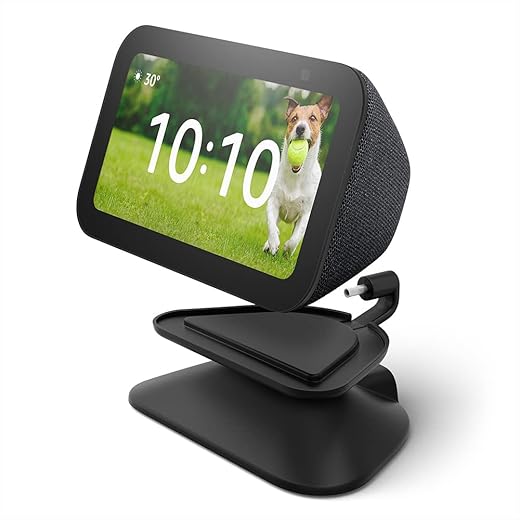
A smart display is a game-changer for your home, becoming an essential partner in your daily life. With technology constantly evolving, these devices offer smarter ways to control everything around you. Imagine a device that allows you to communicate with your doorbell, manage your lighting, and even monitor fitness events right from one screen. The future is here, and owning a smart display means you’re always a step ahead.
One of the standout benefits of a smart display is the extensive range of apps available for download. Whether you need cooking recipes, a weather forecast, or a quick workout guide, these apps are just a tap away. Major brands like Google Nest Hub or Amazon Echo Show are leading sellers that offer AI-powered ecosystems. You can easily view your calendar events or control smart devices in your home using voice commands or touch controls.
Another key advantage is how smart displays integrate seamlessly with your existing devices. If you have a router that connects everything or other smart products from different makers, a smart display works well as a central hub. For instance, you can play music, watch videos on an HDMI-compatible display, or even share messages with just a few easy commands. It becomes a premium addition to any room that enhances your lifestyle.
- Smart home integrations: Control devices like lights and thermostats.
- Entertainment: Stream music and videos or follow along with fitness classes.
- Cooking assistance: Follow recipes step-by-step without needing to touch your tablet.
- Communication: Video call friends and family or leave messages for loved ones.
Living with a smart display means you’re not just keeping up; you’re moving forward. Companies are continuously adding new features, ensuring that your device remains relevant and useful over the years. Something as simple as viewing your fitness stats on a larger screen can motivate you to stay active, while smart reminders help you manage your time effectively.
In conclusion, the benefits of owning a smart display are clear. With advancements in technology and the continuous rollout of new apps, having a smart display in your home ensures you are not just living in the present but are equipped to tackle everything future challenges may bring. Embrace the conveniences that come with this technology; it is truly something every household can benefit from.
How Can a Smart Display Improve Your Home Entertainment Experience?
In today’s digital age, smart displays have become essential hubs for enhancing your home entertainment experience. These voice-activated devices serve as AI-powered interfaces that allow you to easily navigate through different entertainment options. Whether you want to watch a movie on YouTube, check out the latest trends on Instagram, or listen to your favorite music, smart displays can show it all with just a simple command.
For instance, consider the Amazon Echo Show. This device combines a tablet-like interface with built-in capabilities that let you control your smart home. Want to dim the lights while watching a movie? Just say the command, and watch the magic happen. During slow evenings, you can even use it to lock into a room and stream your favorite shows. It offers a seamless experience right at your fingertips.
Moreover, smart displays come equipped with features that give a great image, making each viewing session feel like a cinema experience. With expert insider reviews, Kulwinder explains how the Gemini display can forecast your preferences based on viewing habits, making it easier to find exactly what you want–no more scrolling through endless options that don’t interest you.
Additionally, if you enjoy hosting gatherings, these displays are perfect for sharing content with friends and family. You can easily project your favorite videos or photos on the display, ensuring everyone is engaged. The capability to call up data across various platforms makes smart displays a fantastic choice for any living room. Imagine being able to put on a slideshow during a gathering while also keeping an eye on the latest news, all from the same device.
For yourself or as a gift, investing in a smart display can become a game-changer in how you consume entertainment. With their compact design and built-in features, these devices can turn your kitchen or any other room into a multifunctional entertainment hub, achieving both convenience and fun. Plus, they leave you with more peace of mind, knowing that your smart display is constantly ready to assist with whatever command you throw its way.
In What Ways Does a Smart Display Support Family Communication?
Smart displays are revolutionizing the way families communicate in today’s fast-paced world. These devices offer a personalized experience, enabling family members to share moments, whether they are close together in the kitchen or miles apart. Imagine having a quick video call with your loved ones during the week to catch up on life’s happenings. Products like the Lenovo Smart Display or the Amazon Echo Show make this possible with their high-quality cameras and intuitive interfaces.
One of the standout features of smart displays is their ability to share photos and videos. Families can create albums filled with images from special occasions, which can be accessed and enjoyed by everyone. You can easily configure the settings to ensure that your favorite photos appear on the screen at all times, serving as a reminder of those cherished memories. Whether sharing travel adventures or everyday moments, these devices help keep everyone connected.
Smart displays act as assistants in the home, helping to track schedules, weather forecasts, and even fitness routines. For example, they can activate reminders for family members about upcoming events or appointments, such as a dinner date with friends or the schedule for fitness classes. This feature is incredibly helpful for busy families working to balance multiple lifestyles. When the forecast predicts rain, it can even give you a heads-up so you can plan your day accordingly.
Entertainment is another key way smart displays enhance family communication. You can easily stream music or shows from platforms like Netflix, ensuring that everyone can enjoy their favorite content together. Imagine gathering in the living room while watching a family movie night. Smart displays don’t just serve a functional purpose; they help create special moments where families can bond over shared interests.
In summary, smart displays offer a customizable way for families to stay connected. They facilitate calling, sharing images, and enjoying entertainment, all in one device. As products like the Amazon Echo Show continue to develop, the potential for smarter homes becomes even larger. Embracing these devices can truly enhance the way you communicate with your family, making everyday moments more meaningful.
Q&A:
What exactly is a smart display?
A smart display is a device that combines a touchscreen interface with voice assistant capabilities. It allows users to interact with various applications and services through both touch gestures and voice commands. These devices can display information such as weather updates, calendars, recipes, and even videos, while also serving as virtual assistants to perform tasks like setting reminders or answering questions.
How can a smart display improve my daily life?
A smart display can streamline many day-to-day activities. For instance, it can serve as a central hub for controlling smart home devices, making it easy to adjust lighting, locks, and thermostats all from one screen. It’s also great for video calls, allowing you to connect with family or colleagues more easily. Plus, its ability to provide information at a glance—like traffic updates or news—can help you plan your day better.

Are there any privacy concerns with using a smart display?
Yes, privacy can be a concern with smart displays, especially since many feature built-in cameras and microphones. Users should be aware of how their data is collected and stored by these devices. It’s advisable to regularly check privacy settings, update software for security improvements, and cover cameras when not in use if you feel uncomfortable. Manufacturers often provide options to manage privacy, so reviewing those can be helpful.
What are some popular uses for a smart display in the kitchen?
In the kitchen, a smart display can be incredibly useful for cooking. You can ask it for recipes, watch cooking tutorials, and even set timers hands-free. The visual display allows you to follow along with instructions without needing to touch your device with messy hands. Additionally, you can check your grocery list and make hands-free video calls to friends or family while multitasking.
How do smart displays compare to regular smart speakers?
Smart displays offer more functionality compared to regular smart speakers primarily due to their touchscreen interface. While both can respond to voice commands and control smart home devices, displays provide visual feedback, allowing users to watch videos, read recipes, or see schedules. This makes smart displays better suited for tasks that benefit from a visual component, as opposed to just audio responses.
What are the main features of a Smart Display?
A Smart Display combines a touchscreen interface with voice assistant capabilities, allowing users to interact through both touch and voice. Key features often include a built-in camera for video calls, a speaker for audio playback, integration with smart home devices, calendar and weather updates, and access to various apps and services. These devices can also provide visual content like photos, recipes, and videos, making them multifunctional in daily use.



These other reviews are pretty awful, read this. Originally I was going to maybe rate this 4 stars, but honestly, this is EXACTLY what I’ve been looking for and nothing even comes remotely close to it, so I’ll go ahead and list everything it does great, followed by what needs improvements, and finally what you should NOT purchase this for… and at the end I’ll go over the “general” stuff like screen and sound.IF YOU DON’T WANT TO PULL OUT YOUR PHONE & GO TO ALEXA APPThis is honestly the only reason you should be buying this. Because you can already do everything and more directly on the Alexa app on your phone. So you need to (a) see yourself using the Alexa app a lot, and (b) wish you had it on your wall.IF YOU HAVE SMART DEVICESWithout these, this is just an overpriced and very bad tablet. Maybe you want to control a few devices around your house like your lights, look at the front door camera. If your requirements aren’t too specific with these and you just are willing to take what you can get, then this is it.IF YOU HAVE MULTIPLE OTHER ALEXA SPEAKERSThis really does help bring them together, because you now have a screen, although you might save some money if you get one of the other Echo Show devices. It’s cool to have it up on the wall, be able to again, not use your phone, not pull out some tablet, to change songs.IF YOU WANT A GENERAL OVERVIEW OF SECURITY & THERMOSTATThis will display your Ring alarm status, let you arm and disarm it, and see what your thermostat is set to from another location across the house (I wouldn’t recommend putting them side by side, that’s a waste.)IF YOU WANT YOUR HOME TO FEEL “MODERN” SMARTThis reminds me of things I’ve seen at high-end hotels. It’s just cool to have a touchscreen tablet on the wall, and be able to adjust some lights, play music, adjust the temperature.___________________DO >>NOT<< BUY FOR:1) Managing your device settings. This does a poor job. Your phone can do better. This should only be there to access frequently used devices you've already set up but don't want to navigate through your phone to access.2) Speakers. This isn't it. The sound isn't awful but it's not great, and you should only use this as a supplement to other speakers you already have in your home.3) Watching videos. Don't do it. I know you might think it'll be nice to put this in the kitchen and watch something while you cook, just get some other display or tablet.4) Controlling everything. This kind of ties into #1 above but this should only be set it and forget it, quickly click what you can fit on the screen, and overview of your devices per room. Don't spend a lot of time navigating around. Just get any other tablet at that point.5) Highly specific apps. The apps on it are lackluster. Have some really cool specific idea? You won't be able to do it or it'll end up being bad. You likely won't be able to do exactly what you want, only as I mentioned very very very basic things.__________________THE REALLY BAD, DEFINITELY DON'T BUY:1) Device groups. Currently not supported. If you "favorite" a group of smart devices, it doesn't display it and you can pretty much only do one device at a time, with the "group" being the entire group like "Living Room." This was almost a deal-breaker for me, hopefully they add it later, but I've since found some workarounds for me specific use case. But I wanted to group four mart lights in a room, per room, and have it all display under favorites and could not do that.2) Smooth tablet experience. Nope, this is going to feel like a really cheap tablet because it is a really cheap tablet. You're going to have to be patient and wait one second or maybe even two for some things, and you'll see it stutter once in a while. This is still miles better than anything else like it that's meant to go on your wall. But probably one of the worst if you're comparing it to an iPad or high-end Samsung tablet.__________________The Screen:Feels like a really cheap tablet, but they make it work for what it is. The size could have been bigger but honestly then it'd look weird and not like a wall panel. I like it, I just wish there was some more customizability (there isn't really.)The Audio:Again, feels like a really cheap tablet or laptop.The Design:Works out for being wall-mounted. I like the big bezel.Portability:No. Almost none. Do not expect to unplug this and move it around.The Software:Needs some work but it's not as terrible as people make it out to be. I've noticed a few minor bugs like arming my Ring if a device needs a bypass gets it stuck with no error, just loading. Smart thermostat (Nest) if you try to set it to let's say 72 to 73, it will error out vaguely when you should remember that you need a bigger gap between the low and high number. Cameras take a bit to load but they also do that on the apps in any case. It'll only get better from here.The Cost:I wish it would have been closer to $100, but hey, I bought it at full price because I saw the value. If you do not see the value, do not buy it, you'll be disappointed. This is the type of product that's simultaneously worth $50 and $500.
Nice but Not Perfect – InWall Install is Difficult at Best. I generally really like the Echo Hub. As others have said, it’s not an Echo Show, but a smart home center that can pull your cameras, Ring Alarms, Ring keypads, lights, switches, and other smart devices into a nice wall-mounted panel that offers convenience apart from your phone. It’s meant to be set up, customized, and left alone. It’s not meant to watch TV or interact with like a Show. I have one for each floor of a three-story house and another in our primary bedroom. Three are powered by the 12-volt wire that was already in the wall from our old security system, and one is powered by splitting off the PoE of an already existing in-wall ethernet port in the adjacent room.The Black Friday sale made these much more palatable at just over $100 each and I made my own fast-charging power adapters for just under $6 each. This is my biggest complaint with the Echo Hub. They aren’t really PoE compliant or ready since they don’t have an ethernet port and they don’t just require a Power Delivery (PD) adapter like Amazon states. They require a PD3.0 or PD3.1 adapter that optionally supports Programmable Power Supply (PPS). After a couple of weeks of trial and error I made four power adapters from AITRIP PD65W Fast Charging Type-C USB modules that provided the proper PPS power. I added a REVODATA Gigabit PoE Splitter ($13 additional) to power one of them with 12-volts and 2-amps (24 watt) while maintaining the ethernet data port in the adjacent room. The Hubs look professionally installed since all the power connections are completely hidden in the wall.I also bought the Hubs for Thread and Matter support of window shades. Unfortunately, they didn’t play nicely with other Echo’s nearby, so I disconnected them. Thread connections are much more stable now. However, the shade motors will sometimes flash that they have disconnected. They usually reconnect but will occasionally become unresponsive and show as such in the Alexa app. Thread simply isn’t ready for primetime. At least I have new Hub border routers and a several Thread shades to test software update stability. I wish I could talk to a second-tier engineer instead of getting canned responses from Amazon. Oh well.I didn’t give 5-stars to the Echo Hub. There are more issues, mostly minor, than just the power and Thread issues.1. The interface is SLOW. It needs more horsepower to be more responsive!2. I think the Hubs looks pretty nice on the wall but could be more modern looking by being thinner and having smaller bezels.3. One of the four Hubs shipped with a faulty power adapter that gave a startup error as many others have mentioned.4. I find the brightness of the screen to be very difficult to precisely control. The Hub tries too hard to be “smart”. Why not allow the user to set the exact lowest and highest brightness settings?5. The proximity sensor works well, but I turned it off because the only option to allow the screen to toggle back to the main clock interface takes 10 minutes and can’t be adjusted. WTH? The Hubs are wall-mounted in the highest traffic areas to make them accessible, especially for disarming the Ring alarms. The clock and background images almost never show when proximity is turned on since someone is almost always passing by.
10 Stars! No issues, read for user tips. I’ve had so many Echos over the years, beginning with the 1st Gen, can’t live without them anymore since so much of our home is Alexa connected. I originally got a refurbished 1st Gen Echo Show 15″, not knowing the 2nd gen was coming out. So glad I returned it for the new 21″ Echo Show, it’s absolutely phenomenal!Streaming video: Easy to set up streaming (which I’ve done on our 5″, 8″, and 10″ Echos). The best part of the Echo Show is that Fire TV is included. I easily logged into Hulu, Netflix, Amazon, Max, Peacock, Paramount, Disney+, and Apple TV (other Echo shows only allowed me Hulu, Netflix, and Amazon, I believe). The setup and remote is the same as FireTV.Streaming audio: Easy to connect with your Audible account, and Apple Music or Spotify. I can also stream NPR and podcasts. If you are having a problem with Echo playing the right song, try this: “Echo, play Blinding Lights by the Weeknd on Apple Music” instead just saying “Echo, play Blinding Lights.” Same “Echo, play Christmas Jazz on Apple Music” instead of “Echo, play Christmas Music.” The more specific you are, the better results.Calendar: I tried the Skylight and it is useless. The Echo Show will connect to your Apple Calendars. Our family does shared calendars, and everything shares over to our Echo Show, including announcing events and times to leave.Drop in: It’s amazing! The camera will zoom and adjust automatically. Our Echo Show 10 does this, but it’s on a swivel and always runs into things. This one is much smarter! You can drop in from another Alexa device, or simple the Alexa app on a smart phone.Photos: We have all of our Echo Shows displaying photos that I have uploaded to Amazon photos and then select which photos to show using the Alexa app. Screen is so clear and large, better than any smart frame I’ve ever seen. And friends/family can share photos to it.Announcements: Announcements will show on the screen and announce (I also have push notifications to my watch/phone). Echo hears them perfectly and announces them correctly (our Echo 8 has stopped properly listening and announcing). You can also announce from the Alexa app if you are not home, very convenient for parents :)Widgets: Widgets are easy to add and adjust, just be patient and go through the process.Ads: To remove (most) ads, go into settings on the screen and turn everything to off! I barely get any. If you are still getting those annoying “Wicked” ads, it’s because you have on the “Theme” setting. Once I turned that off, no more “Wicked” (or other future sponsored theme movies), even though we do like the theme setting (Mario is my favorite!).Pricing: Look for a sale. I got the 21″ for $350 on the Black Friday Sale. Would have cost me more than that for a TV, sound bar, and Apple TV for our kitchen (which was our old setup).I LOVE all of our Echo devices. Our Gen 1 is still working amazingly, and glad to add the Echo 21″ to our home.
Product quality as expected. Smooth delivery process. Product quality as expected. Smooth delivery process.
SO LAGGY SOOOOO LAGGY my personal opinions stick to the echo dot. NOT GOOD! Obviously this is just my two cents in my opinion on this other people might have had good ones but The only way that this will get seen is if I put a five stars or else Amazon will take it offSo when we first got it, I could already tell right off the bat that it was laggy so incredibly laggy the screen would not work I mean right out of the gate. I opened the box plugged it in and put it on Wi-Fi. Did the updates all of that and still the thing would not respondit took Alexa almost 5 to 10 business daysto process any request. The model is good. The concept for the model is really good because it is small. It’s compact way smaller than I originally thought it was gonna look but the screen not good volume control pretty decent but my echo dot has way better sound volume than this thing has if you’re literally just wanting it for a screen hook up an iPad to the wall because you’ll get way more response that way than you will from this.
Amazing Smart Home Hub — So Convenient and Easy to Use. The Amazon Echo Hub (8”) has been such a great addition to our home. The screen is the perfect size — big enough to see everything clearly without taking up too much space. It makes managing our smart devices so much easier and way more organized.Setting it up was quick, and the interface is super intuitive. I love being able to adjust lights, check cameras, view reminders, and control everything in one place. The display is bright and responsive, and it looks sleek on the wall.It’s genuinely made our smart home feel more connected and effortless. Definitely a 5/5 purchase — highly recommend!
Not glitchy. I used affirm for this google and holy crap its huge and we love it. We have google in the kitchen. We use google for simple things though. You can use gooogle for alot of things though, we are learning.
We enjoy our Alexa. We have so many Echo devices in our house. We really love all that they are capable of doing, from locking doors, to turning lights off and on, to playing music, trivia games, asking for information, alarm clocks, timers, reminders, calendar events, photo displays and so much more. We have several dots, a show 5, show 8, show 15 and now the 21. I think that speaks for itself. We have different expectations from each of them and they all usually perform the way that is expected. We have no issues with the sound quality. Sometimes what she hears, or doesn’t hear isn’t perfect, but we work around that. We even gave one to my dad to use in his own home. He really enjoys it and with his account, he has the Alexa +. That is one thing I wish we could have with our account, but is not available yet.
I love it. Yes it’s complex but installs easily & meets all my needs. I don’t know what all the complaints are – I’ve had every Echo Show made and this thing is awesome. It is complex and will take while to learn all of the capabilities – but…I have read so may complaints about it wont do this or it only does that – but that’s not true at all. It’s NOT perfect , but it’s a GREAT improvement over everything in the past. I love it and look forward to learning to use it better than I can now. Sound quality and picture quality are both most impressive. My wife and I easily combined our Google calendars – played the Fire TV, and instantly re-connected with ALL my Alexa controlled devices …Some of the cameras are a bit slow to connect – but just as they are on your phone.
A great addition to my Alexa home setup with better voice response and a great photo display. This is my second Echo Show. The first one, which I inherited from my mother-in-law, is in the kitchen where it rotates through family photos. I added this newest Echo Show 5 to my great room, and it has quickly become one of my favorite devices with a good value for the price. I keep it on the end table next to my chair so I can glance over and enjoy old family photos as they rotate through. It is also very convenient for checking my outdoor Blink cameras when the dogs start barking, since the camera feed loads faster than getting my phone out.I have been using it for about a week, and setup was incredibly smooth. Because it was added to my existing Alexa household, everything came with settings for my account. It connected right away, and the whole process took only a few minutes. The device has a solid weight, and the speaker quality is very good for listening to music in the background.Day to day, it responds quickly to voice commands and the screen is crisp. I did reduce the brightness a bit from the default, but that was more of a personal preference than a flaw. I have not found anything to be concerned about with this model. In fact, Alexa + seems to understand my questions more accurately compared to previous version, with fewer misunderstandings.This is a great device if you enjoy seeing your photos, listening to music, or checking camera feeds easily. It fits naturally into my smart home setup and has become something I use regularly.
Great sound and very useful display. The Echo Show works great and has very good sound quality for its size. The screen is clear and responsive, making it easy to use for video calls, music, recipes, and smart home controls. Alexa responds quickly and the setup was very simple. I use it daily and it has been very convenient. Definitely a great addition to the home.
Must buy. Everyone should own one of these great for , playing music and videos, googling without typing. Yes. And of course, for monitoring very good speaker.
Smart displays seem like a great addition to any home. The ability to control devices, access entertainment, and improve communication all from one device is truly impressive. I can definitely see the benefits of investing in one!
Smart displays sound like a great addition to make family life easier and more connected. However, it’s important to consider privacy concerns and manage settings accordingly.
Smart displays seem like a convenient and versatile addition to any home. I appreciate the ability to customize and integrate various smart devices for a seamless experience. Can’t wait to try one out!
Smart displays are definitely making smart homes even smarter! The convenience and integration with various devices make daily tasks much easier to manage. I love the idea of being able to control everything with just a voice command.
Smart displays seem like a great addition to any home, adding convenience and productivity in one device. The idea of being able to easily manage daily tasks and connect with various smart home devices is appealing. I’m definitely considering getting one for myself.
I love how smart displays can make everyday tasks easier and more convenient. The ability to customize them to suit specific needs is a game-changer!