


Today, smart home devices have transformed the way we manage our daily activities, making our lives more convenient than ever. With Alexa, Amazon’s AI-powered virtual assistant, you can take control of your environment, from playing your favorite album to turning off the lights–all with simple voice commands. But with a vast selection of commands at your disposal, it’s essential to know exactly how to utilize this technology to simplify your life effectively.
- Use Alexa routines to combine multiple actions into one command and simplify daily workflows.
- Control smart home devices hands free to save time, manage energy, and automate lighting or thermostats.
- Set alarms, timers, and reminders by voice to stay organized and never miss appointments or tasks.
- Play music, podcasts, news, and weather updates on demand to streamline information and entertainment access.


Once you start exploring the wide range of Alexa commands, you’ll discover that these phrases translate to more than just simple tasks; they become integral ways to enhance energy management and facilitate your daily routines. From setting reminders for important dates or events to pausing your music playback, the scope of commands available is incredibly vast. Not to mention, the ability to control Tuya devices or adjust the settings on your smart speakers adds an entirely new layer of convenience.
In this article, we will delve into an extensive list of Alexa commands, categorized by their respective functions. Whether you’re a tech-savvy owner or new to the world of smart homes, you’ll find specific commands that will help you manage everything from your music playlist to home security with just a few words. Here’s the first step towards making your home smarter, funnier, and incredibly efficient, allowing you to focus on what really matters in life.
Exploring Alexa Commands for Daily Tasks

When you start your day, Alexa can be your perfect companion, helping you with a variety of daily tasks. Whether you’re waking up to your favorite playlist or setting a timer for your morning eggs, these voice commands can make your life easier. For instance, you can say, “Alexa, wake me up at 7 AM,” which ensures you start your day on time without needing to reach for your smartphone. This handy feature allows you to stay focused on your morning routine.
As you go about your day, Alexa continues to provide support. You can ask, “Alexa, stop the music,” when you need silence, or “Alexa, play my fitness audiobook” during your commute. This interaction is made even more enjoyable when you ask for funny jokes to lighten the mood. The variety of skills Alexa offers raises the bar for smart home interaction, making it easy to switch between tasks without lifting a finger. If you’re looking to get into a focused work mode, simply say, “Alexa, set the volume to 5,” to optimize your audio experience on your Windows device.
In case of an emergency, Alexa’s ability to respond quickly is invaluable. Commands like “Alexa, call 911” can be life-saving in critical situations. Moreover, if you have smart light switches, you can manage your home lighting seamlessly by saying, “Alexa, turn on the living room lights.” This command gets you hands-free control of your environment, which is especially useful when your hands are full.
Experts suggest that mastering these commands can simplify interactions with your devices. You can create lists for groceries or tasks by saying, “Alexa, add the items to my shopping list.” These simple phrases empower users to make the most out of their experiences. For instance, if you enjoy cooking, you can ask, “Alexa, give me a recipe for Easter eggs,” and you’ll have a delightful project to tackle.
Overall, integrating Alexa into your daily activities transforms mundane tasks into engaging experiences. By leveraging voice commands, you save time and focus on what really matters. As you explore these features, you’ll find that the compatibility with products available on Amazon, like the Echo Dot or Fire TV Stick, enhances your smart home setup. So next time you consider what Alexa can do, remember that it’s more than just a voice; it’s a tool designed to make life fun and easy.
Managing Your Schedule with Alexa
Imagine a world where your days are perfectly organized without any hassle. With Alexa, that world is a reality. This AI-powered assistant is a star when it comes to managing your schedule. Simply start by enabling the calendar skill, and you’ll find it incredibly useful for checking appointments, reminders, and events. You can even set it to respond with funny reminders that’ll make you smile throughout your busy day.
To get started, you’ll need to have compatible speakers installed and connected to your Wi-Fi. Once set up, you can ask Alexa to call out your schedule for the day, reminding you about meetings, travel plans, and even your laundry app notifications. Alexa can also help you cancel or reschedule appointments with just a few voice commands, making it simple to keep your itinerary up to date. If you want to customize your experience, you can link it with HomeKit to manage your smart home devices simultaneously.
When it comes to daily tasks, Alexa is always up for the job. For instance, while you’re shopping online, you can ask Alexa to remind you about upcoming events. “Hey Alexa, what’s on my schedule for today?” or “Add my meeting to the calendar” are just a few of the basic words you can say to get started. If you have travel plans, simply ask about the weather or traffic conditions so you can plan accordingly. The skills Alexa offers can feel like a personal tour guide through your busy life.
| Product | Description |
|---|---|
| Echo Dot | Compact smart speaker with Alexa built-in for voice control, music, reminders, and smart home management. |
| Smart Light Bulbs | Voice-controlled lighting that works with Alexa to adjust brightness, colors, and schedules hands-free. |
| Smart Thermostat | Allows you to control and automate your home’s temperature using Alexa for comfort and energy efficiency. |
With Alexa’s capabilities, managing your schedule goes beyond just reminders. You can also create playlists of your favorite songs or listen to the latest media updates. Adjust the volume just by asking, and if you’re in a British mood, request songs to brighten your day. Whether you’re preparing for a busy week or winding down on the weekend, Alexa makes your life much easier with its seamless interaction.
Setting Reminders and Alarms with Your Echo
You’ve probably heard about the amazing capabilities of your Amazon Echo to simplify daily tasks. One of the most practical topics is how to effectively use it for setting reminders and alarms. This is especially helpful for those who find themselves busy at work or getting caught up in their daily commute. By using simple voice commands, you can activate and manage reminders without missing a beat.
To start, all you need to do is specify what reminder or alarm you want. For instance, you might say, “Alexa, remind me to take out the trash at 7 PM” or “Set an alarm for 6:30 AM.” This way, you’ll always keep track of important tasks and never wake up late again. If you want a reminder while you’re away, the response from your Echo keeps you informed even when you’re busy in the kitchen or on the go. Just ensure your device is connected to the internet, so it can respond as needed.
As Echo owners, you can also activate music playback to help ease the transition from one task to another. If you set a reminder to wake up, you could follow it up with specific songs from artists like The Beatles to get your day rolling. Just say, “Alexa, play some music after my alarm goes off.” This is a great way to turn on your energy in the mornings!
For those who enjoy audiobooks, you can ask your Echo to read reminders as you play your favorite book. For example, “Alexa, remind me to call Mom after chapter two of my audiobook.” This feature helps you stay engaged in your reading while also managing your tasks. Several users report that integrating reminders with their daily routines enables a smoother flow of activities.
To avoid issues with forgotten reminders, you can unmute your device while setting up alarms to ensure it captures everything properly. Also, if you’d like to stop an alarm, just say, “Alexa, stop” or “Alexa, snooze.” For users who prefer their reminders more visually, consider connecting your Echo Show to see reminders and alarms on the screen. With these tips, your Amazon Echo will truly become a star of organization in your home!
Controlling Smart Home Devices with Alexa
In today’s connected world, controlling smart home devices has never been easier. Alexa allows you to manage a wide selection of devices, giving you the power to customize your home environment with just a few basic commands. Whether you’re adjusting your lighting, checking energy usage, or setting a timer, Alexa makes these tasks simple and quick, often just taking a few seconds!
Imagine having the ability to turn on your living room lights by simply asking Alexa. You can even create custom routines, such as “Alexa, goodnight” to turn off all the lights and lock the doors in one command. This is especially handy after long days or when you’re getting ready for bed. Plus, for fitness enthusiasts, you can sync your smart speakers to play workout playlists or give you reminders for your exercise routines.
For those who love shopping, Alexa can assist you in ordering products through services like Amazon. Just say, “Alexa, order more batteries” or “Alexa, add milk to my shopping list.” You’ll be surprised how much time you’ll save by using voice commands instead of manually checking items off your list.
Troubleshooting any issues with your devices is simple with Alexa too. If something isn’t working, you can ask, “Alexa, what’s wrong with my lights?” or check the status of your smart fixtures. This integration helps maintain a smoothly operating home environment, from smaller tasks like turning on a lamp to grander operations like managing multiple devices at once.
In the realm of entertainment, you can easily pair Alexa with smart speakers to play your favorite songs, including classics from The Beatles. Just say, “Alexa, play Hey Jude,” and enjoy. The selection of connected devices is continually expanding, so there is always something new to explore.
Don’t forget about the potential for energy savings! By using smart plugs and lights, you can monitor your energy usage through Alexa, allowing you to make informed choices about your consumption. For example, set reminders to turn off unused devices or plan to turn them off during peak hours.
So, whether you’re setting an hour timer while cooking, asking for the latest sports scores, or ordering the newest Apple gadget, Alexa is there to assist you seamlessly. Make sure all your devices are installed and connected to get the most out of your smart home experience!
Playing Music and Podcasts on Command
With Alexa as your smart assistant, playing music or podcasts is as easy as saying a few words. In seconds, you can have your favorite tunes or the latest podcast episode started without even lifting a finger. For example, you can simply say, “Alexa, play my relaxing music playlist,” and she’ll get right to it! This allows for seamless interaction, whether you’re on your smartphone, in the kitchen, or lounging in your living room.
Sometimes you need help honing in on exactly what you want to listen to. Saying “Alexa, what’s the weather today?” can lead to a specific audio response before you decide on the perfect soundtrack for your day. You’ll appreciate how Alexa handles everything from controlling playback to adjusting lighting in the room for a better ambiance. If you want to ride the wave of energy during your workout, just say, “Alexa, play upbeat music,” and feel motivated!
If you ever want to cancel a song or podcast mid-play, just say “Alexa, stop,” and she’ll pause it, leaving you free to shift focus to other tasks. For users who prefer a more hands-on approach, devices like Echo Dot or Echo Show offer basic controls and visual displays. Having an Alexa-enabled device connected to your Wi-Fi allows for a smarter home setup, letting you control not just audio but other smart devices, like lighting and appliances, all from the same spot.
For those entertaining guests or looking for something funny, you can request a specific genre or even phrases like, “Alexa, play party music,” to set an upbeat mood. There’s no need to browse through endless playlists; Alexa helps you stay organized and focused. With options like Echo Studio for premium audio or the compact Echo Flex for smaller spaces, you can enhance your experience while keeping it convenient, making sure your music requests are only a word away.
Accessing News and Weather Updates with Alexa
Your Alexa assistant is a powerful tool for staying updated with the latest news and weather, making it easier to manage your daily tasks. When you want to know what’s happening in the world or how to plan your day, simply say, “Alexa, what’s the news?” and it gets you connected to a variety of sources. If you prefer something specific, you can pair your preferences by saying, “Alexa, play [specified news source].” This way, you control the flow of information that’s most relevant to you.
Sometimes, while listening to your daily updates, you may want to pause or skip to the next segment. Just say, “Alexa, pause,” and if necessary, follow up with “Alexa, resume.” These simple commands make it easier to manage the content played in the background while you complete other tasks. It’s always helpful to have your hands free, especially when you’re working on chores or running errands.
Weather updates are just as easy to access. A quick, “Alexa, what’s the weather today?” will provide you with an immediate forecast. You can also specify future times by saying, “Alexa, what’s the weather this weekend?” This can help you schedule your outings and adjustments. If you have a smart home setup with HomeKit or Tuya, Alexa can even help you with adjustments based on the weather, like adjusting climate control settings.
For those who like funny and fun interactions, try saying, “Alexa, tell me a funny joke,” for a little amusement amid your busy schedule. If you’re planning special occasions, like Easter, you might find it useful to order supplies or prepare lists for your celebrations. You can say, “Alexa, add eggs to my shopping list,” making it easy to keep track of everything you need.
In conclusion, accessing news and weather updates through Alexa isn’t just smart; it’s a significant time-saver as well. With these tips, you can make your daily life a little more organized and enjoyable. Remember to explore additional features on your Amazon Echo, such as ordering products through Amazon or getting detailed traffic reports. These features ensure that your Alexa’s assistance extends beyond just simple commands into a more integrated part of your daily routine.
Q&A:
What are some common Alexa commands I can use for daily tasks?
Alexa can assist with various daily tasks. For example, you can ask her to set timers or alarms by saying, “Alexa, set a timer for 10 minutes,” or “Alexa, wake me up at 7 AM.” You can also check the weather by simply saying, “Alexa, what’s the weather today?” Other commands include playing music, like “Alexa, play my workout playlist,” or controlling smart home devices, such as “Alexa, turn off the living room lights.”
How can I control my smart home devices using Alexa?
To control smart home devices with Alexa, first ensure that your devices are compatible and connected to the same Wi-Fi network as your Alexa device. Then, you can use commands like “Alexa, turn on the kitchen lights,” or “Alexa, set the thermostat to 72 degrees.” It’s helpful to group devices by rooms; for example, you can say, “Alexa, turn off all lights in the bedroom,” if you have set up room-specific commands.
Can I ask Alexa to remind me of important dates and tasks?
Yes, you can use Alexa to set reminders for important dates and tasks. Simply say, “Alexa, remind me to call Mom tomorrow at 5 PM,” or “Alexa, remind me about my appointment on Friday at noon.” Alexa can also provide a list of reminders by saying, “Alexa, what are my reminders?” This feature helps ensure that you don’t forget important commitments.
Are there any fun commands I can use to entertain myself with Alexa?
Absolutely! Alexa has a variety of fun commands. You can ask her to tell you jokes by saying, “Alexa, tell me a joke.” If you’re in the mood for games, try saying, “Alexa, play 20 Questions,” or “Alexa, play a trivia quiz.” You can also ask her to give you a random fact by saying, “Alexa, give me a fun fact.” These commands can lighten the mood and provide entertainment during your day.
How can I customize Alexa to better suit my preferences?
To customize Alexa, you can start by adjusting her settings in the Alexa app. You can change the wake word, manage connected devices, and adjust privacy settings. Additionally, you can create Routines by saying, “Alexa, create a routine,” which allows you to program multiple actions with one command. For instance, a morning routine might include turning on the lights, providing news updates, and starting your favorite music. Customization helps make Alexa work better for your specific lifestyle.
What types of tasks can I perform using Alexa commands?
Alexa can assist you with a variety of tasks that can simplify daily activities. For example, you can use voice commands to set reminders, alarms, and timers, which can help you manage your schedule more effectively. Additionally, you can ask Alexa to play music, provide weather updates, give news briefings, and control smart home devices like lights and thermostats. Furthermore, you can use Alexa to order products from Amazon, check your shopping list, or even make calls and send messages. All these features can help streamline your routine and create a more organized environment.
How can I customize Alexa commands to better suit my needs?
To customize Alexa commands, you can create routines that combine multiple actions triggered by a single command. For instance, you might have a morning routine that includes turning on your lights, playing your favorite news station, and brewing coffee all at once by saying “Alexa, start my day.” You can set these routines through the Alexa app, where you can choose specific commands, add actions, and even set schedules for when you want these routines to run. Additionally, consider using skills that align with your interests, such as fitness tracking or recipe management, to enhance Alexa’s functionality in your daily life. This level of customization allows you to tailor the experience according to your personal preferences and lifestyle.

Other Articles

Quick Fixes for Common Phone Speaker Problems and Solutions You Can Try

This book is fab for those who want to get the most out of their Alexa it’s well written (big easy to read writting) by people who work with these devices every day. you won’t need to buy a new one every time you upgrade devices as it focuses on what you do with the voice commands. Makes a great gift for those with an alexa but not really using it for much. There’s also a fun section the kids will have a great time with ! Very happy with this purchase
Very informative and well written guide.
Very useful
SO LAGGY SOOOOO LAGGY my personal opinions stick to the echo dot. NOT GOOD! Obviously this is just my two cents in my opinion on this other people might have had good ones but The only way that this will get seen is if I put a five stars or else Amazon will take it offSo when we first got it, I could already tell right off the bat that it was laggy so incredibly laggy the screen would not work I mean right out of the gate. I opened the box plugged it in and put it on Wi-Fi. Did the updates all of that and still the thing would not respondit took Alexa almost 5 to 10 business daysto process any request. The model is good. The concept for the model is really good because it is small. It’s compact way smaller than I originally thought it was gonna look but the screen not good volume control pretty decent but my echo dot has way better sound volume than this thing has if you’re literally just wanting it for a screen hook up an iPad to the wall because you’ll get way more response that way than you will from this.
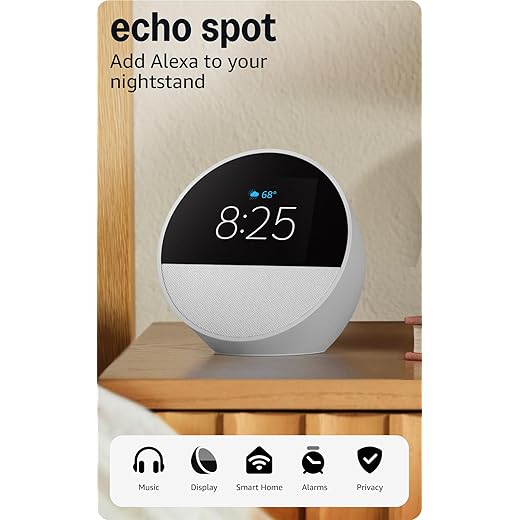
Great for the nightstand. I’m new to Alexa and got this so I can have this on my nightstand with time display and the temperature . Also play my music when cleaning my bedroom and changing the sheets. I’ve used Alexa to turn the heater up or down. Since I’m new to Alexa I know I’m not using it fully since I don’t have smart things around the house, but it’s a start. Setting it up was easy and I went through all of the Alexa app settings to get familiar with it. The voice control is nice with no issues. The sound for my music sounds great and has a 3 band equalizer in the app. The display shows your current weather with the temperature and clouds or rain or shine.Value for the price would depend on how much Alexa functions you use. But I like it all the same even as nightstand alarm clock with Alexa.
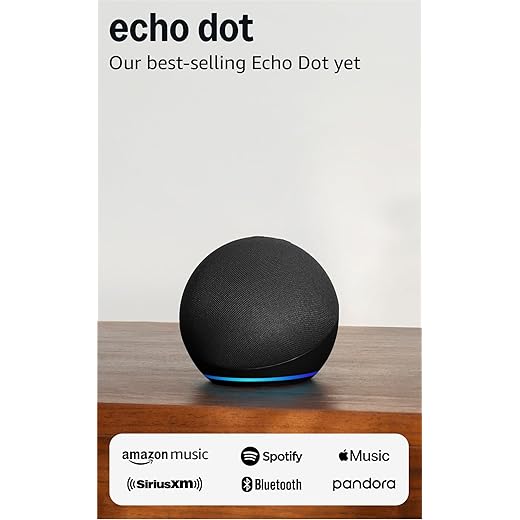
Great Sound in a Compact Device. I’m really impressed with the Echo Dot. Its sound is surprisingly powerful and clear for such a compact device, perfect for bedrooms or office spaces. Alexa responds quickly, understands commands well, and makes tasks like playing music, checking the weather, or controlling smart devices effortless. The charcoal design looks modern and fits any room. It’s practical, reliable, and very easy to set up. An excellent choice for anyone seeking convenience and great audio in a small format.
Great Sound in a Compact Device. I’m really impressed with the Echo Dot. Its sound is surprisingly powerful and clear for such a compact device, perfect for bedrooms or office spaces. Alexa responds quickly, understands commands well, and makes tasks like playing music, checking the weather, or controlling smart devices effortless. The charcoal design looks modern and fits any room. It’s practical, reliable, and very easy to set up. An excellent choice for anyone seeking convenience and great audio in a small format.
The Wonderful Echo Spot. This is a great device, the first time we’ve added to our Alexa collection around the house in years. It replaced a small digital clock on the counter in the master bath at the house… and what a difference! Much better clock, more elegant and easier to read, and the device provides the date, and capable of providing much more than that. But just out of the box, great!Unlike the clock it replaced, this does require an AC outlet, which we knew from what Amazon was showing in the description. But this is well worth giving up one outlet on the counter in the bath.Sound quality is good if not great for the size, and more than adequate to upgrade the master bath and open up music, news, timers, digital books we enjoy from audible (an Amazon company), etc. Super. Everything is hands free, which is great when your hands are wet in the bath or kitchen, etc. And setup really was a breeze, for users like us who already have Alexa devices in the house. Right out of the box, it found our WiFi (with an impossible password) and didn’t need any help from us hooking right up to our WiFi automatically and we were good to go!Finally, the price was right! These devices are priced very reasonably on Amazon, with no middle man, so to speak.Highly recommended. Enjoy!
Great sound, easy to use. This is my 1st echo device. I use my phone constantly to look up everything and thought this would be so much easier and it is!! I love it. I have an Amazon account, who doesn’t, so when ordering check the box for easy set up. I opened the box, plugged it in and the system started running and connected to my wifi seamlessly. All I did was read each page and press continue as system also synced to my phone when I downloaded the app. I’m older so being able to set this up by myself, no grand kids around, was wonderful. Amazon has the best interface of all shopping apps for sure, although streaming could use some help, haha. I’ve been using the Alexa echo dot non stop, music has a beautiful sound and I looked up a recipe, weather and I don’t know why I waited so long to get one. Great buys right now too. Worth the price and small size that fits anywhere you can plug in.
Great sound, easy to use. This is my 1st echo device. I use my phone constantly to look up everything and thought this would be so much easier and it is!! I love it. I have an Amazon account, who doesn’t, so when ordering check the box for easy set up. I opened the box, plugged it in and the system started running and connected to my wifi seamlessly. All I did was read each page and press continue as system also synced to my phone when I downloaded the app. I’m older so being able to set this up by myself, no grand kids around, was wonderful. Amazon has the best interface of all shopping apps for sure, although streaming could use some help, haha. I’ve been using the Alexa echo dot non stop, music has a beautiful sound and I looked up a recipe, weather and I don’t know why I waited so long to get one. Great buys right now too. Worth the price and small size that fits anywhere you can plug in.
A great addition to my Alexa home setup with better voice response and a great photo display. This is my second Echo Show. The first one, which I inherited from my mother-in-law, is in the kitchen where it rotates through family photos. I added this newest Echo Show 5 to my great room, and it has quickly become one of my favorite devices with a good value for the price. I keep it on the end table next to my chair so I can glance over and enjoy old family photos as they rotate through. It is also very convenient for checking my outdoor Blink cameras when the dogs start barking, since the camera feed loads faster than getting my phone out.I have been using it for about a week, and setup was incredibly smooth. Because it was added to my existing Alexa household, everything came with settings for my account. It connected right away, and the whole process took only a few minutes. The device has a solid weight, and the speaker quality is very good for listening to music in the background.Day to day, it responds quickly to voice commands and the screen is crisp. I did reduce the brightness a bit from the default, but that was more of a personal preference than a flaw. I have not found anything to be concerned about with this model. In fact, Alexa + seems to understand my questions more accurately compared to previous version, with fewer misunderstandings.This is a great device if you enjoy seeing your photos, listening to music, or checking camera feeds easily. It fits naturally into my smart home setup and has become something I use regularly.
Eco spot, eco dot, eco ball. Love all 3. Love the look. I bought the base for an extra USB PORT. Has a nice sound. Now I have 3 different ecos so I can walk around the apt n still hear music while doing house chores. Time, temperature, on face in of item. Voice line shows when she’s listening.Also shows what song is playing by who. Love it. Happy purchase n easy set up.
Great Smart Speaker for Everyday Use. The Amazon Echo Dot is an excellent smart speaker that delivers great value for its size and price. The sound quality is surprisingly clear with good bass for a compact device, making it perfect for a bedroom, office, or kitchen. I also love its sleek, modern design—it blends well with any room décor. Overall, the Echo Dot is a reliable, affordable, and convenient smart assistant. Highly recommended for anyone looking to make their home smarter without spending too much.
Great sound and very useful display. The Echo Show works great and has very good sound quality for its size. The screen is clear and responsive, making it easy to use for video calls, music, recipes, and smart home controls. Alexa responds quickly and the setup was very simple. I use it daily and it has been very convenient. Definitely a great addition to the home.
Great Smart Speaker for Everyday Use. The Amazon Echo Dot is an excellent smart speaker that delivers great value for its size and price. The sound quality is surprisingly clear with good bass for a compact device, making it perfect for a bedroom, office, or kitchen. I also love its sleek, modern design—it blends well with any room décor. Overall, the Echo Dot is a reliable, affordable, and convenient smart assistant. Highly recommended for anyone looking to make their home smarter without spending too much.
Alexa truly is a personal assistant! I love how it can help with reminders, manage smart home devices, and even play music seamlessly. Such a useful tool for staying organized and efficient.
I love how convenient Alexa makes controlling smart devices in my home! It saves so much time and makes daily tasks easier.
This article provides great tips on how to personalize Alexa commands to make daily tasks even easier. I can’t wait to try setting up some routines to better suit my needs!
I didn’t realize how customizable Alexa commands could be – I’m excited to try creating some routines to streamline my day!
Alexa has truly made my daily tasks much more efficient and convenient. I love being able to manage my schedule, set reminders, and control my smart home devices all with just my voice commands. It’s like having a personal assistant right at home!
I didn’t know I could customize Alexa commands to create routines, this is a game-changer for my daily routine! Thank you for the tip.