


Setting up a smart home can seem pretty complex at first, but it doesn’t have to be. With the right options and guidance, you can control everything from doorbells to locks with just a command. By connecting devices through your router and the internet, you’ll find that integrating smart technology into your routine is not only convenient but also safe. In this guide, we’ll show you how to set up your smart home in a few simple steps.
- Ensure a strong, updated Wi-Fi router to support multiple smart devices and stable connections throughout your home.
- Start with beginner-friendly devices like smart bulbs, plugs, and a smart speaker as your central control hub.
- Choose a compatible ecosystem (Amazon Alexa, Google Home, or Apple HomeKit) to simplify device integration and expansion.
- Keep firmware updated, use strong unique passwords, enable two-factor authentication, and consider a separate network for devices.
- Budget by prioritizing essential devices, look for starter kits or sales, and plan placements for optimal signal coverage.



Many people worry that their smart home setup won’t work as intended or that they cannot control their devices effectively. However, with pre-configured versions of devices like smart speakers and cameras, this process has become much easier. By following some helpful routines and ensuring your firmware is up to date, you’ll be able to automate tasks that save time and improve efficiency. Here’s a breakdown of how to get started.
Start by choosing the right devices for your setup. From smart lights to smart locks, the options available can seem overwhelming. But by focusing on your specific needs and the rooms you want to enhance, you can expand your smart home in solid steps. For instance, integrating a Nest thermostat or connecting your smart speaker can toast your experience and add layers of convenience that people love. Be sure to leave no room for failures by checking compatibility and ensuring all devices are running smoothly.
Getting Started with Smart Home Technology
Setting up your smart home can be an exciting journey, especially if you’re looking to enhance convenience and efficiency in your daily life. The right start is essential, and it all begins with your Wi-Fi network. Smart devices rely on a strong and stable connection to communicate effectively. Make sure your router is up to date and can handle the additional traffic these devices may generate.

When you pick devices for your smart home, consider your lifestyle and the tasks you’d like to automate. For instance, smart speakers like the Amazon Echo (available on amazon.com) can be a great first addition. They allow you to control other devices by voice, stream music like Carrie Underwood’s latest hits, or even help with tasks like heating your room automatically.
Here’s a simple version to get started: Think about the rooms you spend the most time in. Wake up in the morning and enjoy your coffee while asking your smart assistant for the day’s news, or set up smart displays to show your calendar. These displays can help boost your productivity by keeping important content at the forefront. Below is a useful table showcasing some smart devices to consider for your initial setup:
| Device | Description | Link |
|---|---|---|
| Amazon Echo | Smart speaker with built-in Alexa for voice control, automation, music, and smart home management | View on Amazon |
| Philips Hue Smart Bulbs | Smart lighting system with remote control, scheduling, and customizable colors | View on Amazon |
| Nest Thermostat | Intelligent thermostat that optimizes heating and cooling for energy efficiency | View on Amazon |
It’s helpful to remember that the larger your smart system becomes, the more important it is to ensure that your Wi-Fi network is optimized. Certain routers designed for smart homes might have features that improve connectivity, especially with multiple devices running simultaneously.
When you’re running through your tasks, don’t hesitate to go back and edit settings as needed. As you connect more devices, you might find certain configurations more efficient than others. They’re all related in how they can affect your daily routine.
In the end, it doesn’t matter how many devices you start with; what counts is choosing the right ones that fit your needs. Once you’ve set up your smart home, you’ll be amazed at how much easier tasks become. So, take that first step, and enjoy building your new high-tech living space!
Understanding Smart Home Devices
Setting up a smart home can seem overwhelming, but understanding the devices available is the first step to a seamless experience. Smart home devices come in various forms and functionalities, allowing you to automate tasks and enhance your living environment with ease. From smart thermostats like the Ecobee SmartThermostat to voice assistants such as the Amazon Echo, these devices can communicate with one another, ensuring everything runs smoothly.
Each smart device has unique features that can affect how you interact with your home. For instance, smart lights can be controlled by voice command or smartphone apps, allowing you to turn them on or off automatically. This is one of the easiest options to start with. You might enjoy setting reminders to tick tasks off your list or even boosting your home’s security with smart cameras.
When choosing devices, there are certain criteria to consider. Ensure they are compatible with your system and can be controlled from a central hub, like a smartphone or tablet. This way, you can easily access everything from one place. If you enter a command, these devices will follow your instructions, whether it’s adjusting the thermostat to the perfect temperature or playing your favorite music on command.
For the ultimate smart home experience, it’s essential to select devices that integrate well with each other. For example, linking your smart thermostat to your voice assistant can allow for temperature adjustments without lifting a finger. A solid Wi-Fi connection is vital, as it impacts how well devices communicate. In this tech walkthrough, you’ll find options that not only suit your needs but also come with deals that can fit your budget.
Smart home devices don’t have to be complicated; with the right choices, you can create an efficient ecosystem that works for you. Whether you’re investing in tech for yourself or looking for the perfect gift for someone special, these devices enhance convenience, automate daily tasks, and provide a comfortable living experience. Dive into the world of smart homes and enjoy all the possibilities they offer!
Choosing the Right Ecosystem
Choosing the right smart home ecosystem is crucial for simplifying your life and ensuring that all your devices work smoothly together. The ecosystem you select will dictate how your devices connect and communicate. For people just starting, a basic ecosystem like Google Home or Amazon Alexa can be very helpful. These options allow you to control multiple devices, such as smart lights, locks, and plugs, all using your voice or through a simple app on your phones.
Once you’ve entered the world of smart home technology, you’ll want a system that can expand as your needs change. For example, a range of devices is available on Amazon that can be easily integrated. The Philips Hue smart lights are a great option that allows you to brighten or dim your living space using a printed card or your mobile device. This flexibility means you can add more devices later without having to replace your entire setup.
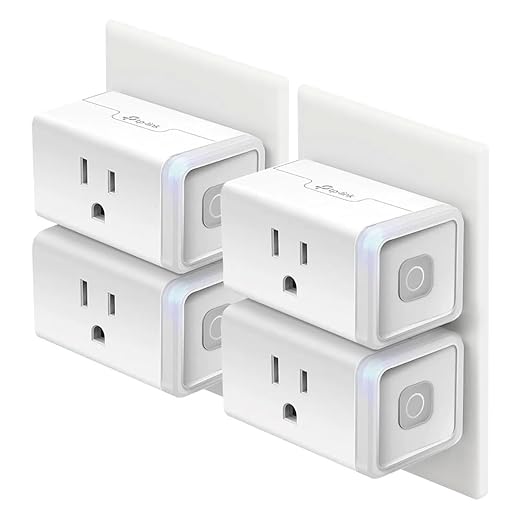
When you consider the energy efficiency of your devices, options like the TP-Link Kasa Smart Plug can help you monitor energy usage while also giving you control over plugged devices. This model is designed to be straightforward and user-friendly, making it easy to connect and set settings. The flashing LED indicator tells you when the device is ready for action.
Another important aspect is compatibility with existing locks and doors. Smart locks like the August Smart Lock allow you to access your home more conveniently, as they can be switched using your phone or a voice command. This level of control is not only practical but also enhances the security of your home.
In conclusion, when choosing the right ecosystem, look for one that can control a full range of smart devices. Make sure it’s capable of working with energy-efficient products and can easily restore settings or flash options when needed. With the right setup, your smart home can be a seamless part of your everyday life, giving you the power to make your living space more comfortable and efficient.
Budgeting for Your Smart Home Setup
When embarking on your journey to create a smart home, budgeting is crucial. Knowing what you need is the first step in simplifying the process. The easiest way to start is to list out the basic systems you want to integrate, such as smart thermostats, home speakers like HomePods, smart lights, and security cameras. These items will become essential in your daily life, so it’s important to plan accordingly.
People often underestimate the total cost involved in the setup. It’s not just the smart devices themselves but also the accessories needed for them to work efficiently within your network, such as a strong router to ensure good signal coverage throughout your home. Investing in a reliable tech system like the TP-Link Archer A8 can help save you headaches later on.
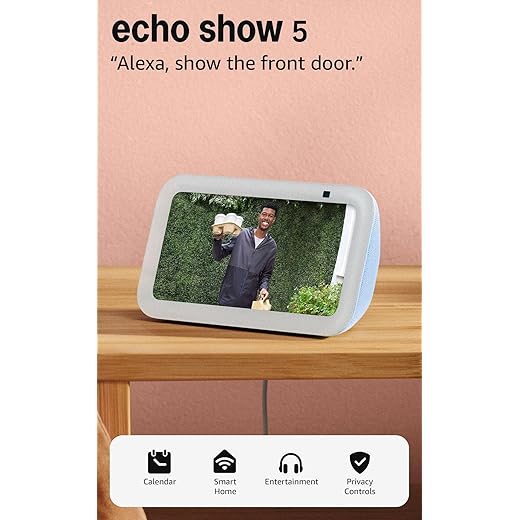
Deciding on how much to spend can feel overwhelming. Whether you prefer to use a credit card or save up for larger purchases, a well-structured budget helps you stay on track. For example, if you’re considering running smart displays like the Echo Show, confirm their pricing and features beforehand. Consider purchasing a starter kit that provides a full range of devices–this can sometimes be cheaper than buying each item separately.
Don’t forget to look out for online deals or seasonal discounts on websites like Amazon, where you can find useful products at a reduced price. The Sonos One, for instance, is often listed in promotional packaging, making it an attractive gift for anyone looking to upgrade their audio experience. Always check reviews and ratings to ensure you select a product that fits your needs.
Once you’ve made your purchases, take time to install devices efficiently across different areas of your home. Pay attention to wall placements and signal strength so that your items, like security cameras or smart lights, can all communicate seamlessly within your network. This planning will pay off in how well everything operates together.
Assessing Your Home’s Compatibility
When it comes to setting up a smart home, the first step is assessing your home’s compatibility with smart tech. You’ll want to evaluate everything from your existing infrastructure to your personal preferences. For example, if you’re planning to install smart doorbells or lighting, check the walls for suitable wiring or the presence of a power socket. If the connection is weak or if there’s no socket available, you might need an adapter or to modify your setup to accommodate these smart devices.
Here’s another key point: evaluate your broadband speed. Many smart systems, such as assistants like Amazon Alexa or Google Home, require a solid internet connection to function smoothly. Make sure your broadband speed is sufficient, as these devices might struggle without a strong connection. If your current broadband version is slow, consider upgrading to ensure everything works effectively.
While you’re assessing, take some time to talk about your daily routines. Think about what smart devices you need to include to make your life easier. For instance, you might want a smart thermostat that automatically adjusts based on your wake-up schedule or smart lights that turn on/off with a simple voice command. Such features can significantly enhance your home experience.
If you have a lot of media systems, look for products designed to integrate seamlessly. For example, smart speakers that can control cable boxes or media players allow you to enjoy full functionality with minimal steps. Make sure each device can communicate with the others for a truly connected home. Products like the Amazon Echo or Google Nest Audio often come highly recommended for this purpose.
Lastly, don’t forget to leave some room for future additions. Smart home technology is constantly evolving, which means the systems you pick today might need to adapt tomorrow. Keeping your setup flexible will ensure you can effortlessly integrate new devices as they come out. So go ahead, assess your home’s compatibility, and get ready to enjoy the many benefits of a smart home!
Essential Smart Home Devices to Consider
Setting up your smart home can feel like a daunting task, but it is quite straightforward once you know what devices to include. Here’s a walkthrough of essential smart home devices to help you create a connected and efficient space. These devices will not only enhance your home’s functionality but also provide convenience and security.
First on the list are smart thermostats. These handy gadgets allow you to control your home’s heating and cooling from your smartphone or tablet. Popular options, such as the Nest Learning Thermostat, offer features like scheduling, reminders, and energy consumption reports. This way, you can ensure your home stays at the perfect temperature while saving on energy bills.
Next up are smart plugs, which turn your regular devices into smart ones. With products like the TP-Link Kasa Smart Plug, you can control lights, fans, and other appliances from your phone. This connection helps you create a more convenient environment, and they’re also great for schedule features and controlling your devices when you’re away from home.
Smart lighting is another critical aspect of a smart home setup. The Philips Hue White LED Starter Kit allows you to customize the lighting in your rooms. With simple voice commands, you can adjust the brightness or change colors to fit your mood. This feature eliminates the need to walk around turning off lights, making your life a bit easier.
In addition to these, consider smart security systems, which provide peace of mind. Devices like the Ring Video Doorbell let you see who is at your door through your phone, reducing the chance of interference or breaches. They come with motion sensors, so you’ll get notifications and reminders whenever someone arrives.
Finally, using a smart home assistant, such as the Amazon Echo Dot, can tie everything together. This voice-controlled device allows you to manage your smart home with simple voice commands. From playing music to turning on lights, it makes your smart home truly hands-free.
In conclusion, building your smart home doesn’t have to be complicated. With these essential devices–thermostats, plugs, lighting, security systems, and voice assistants–you can easily elevate your living experience. Just remember to tailor your setup based on your needs, and you’ll have a fully functional smart home in no time!
Smart Speakers: What You Need to Know
Smart speakers have become a popular addition to many households. These devices not only let you listen to your favorite music but also help you control various aspects of your smart home with just your voice. You can tick off your daily tasks while enjoying a seamless experience. When you enter a room, simply talk to your speaker, and it will respond within seconds!

Most smart speakers require a Wi-Fi connection to function. This is crucial, as a separate network keeps your devices connected and allows for smoother communication. Models like the Amazon Echo Dot and Google Nest Mini are excellent examples of smart speakers that provide various features, including the ability to control compatible smart doorbells and smart lights, making your home an easier and more convenient place to live.
Here’s what you need to know about smart speakers:
- Voice Activation: You can command them to play music, set reminders, or provide weather updates without lifting a finger.
- Firmware Updates: These devices receive regular updates, ensuring they are always running the latest features and security protocols.
- Connection Range: Smart speakers work effectively within a specified range of your routers, so keep that in mind when setting them up in your home.
- Safety: They are designed to make everything safer, allowing you to monitor your home even when you’re not there.
Many smart speakers can also serve as the hub of your network, allowing you to connect various smart devices. For example, the Echo Show not only plays music but also displays visuals, making it a fantastic gift for those who love smart home tech. When looking for deals, always pick products with high customer ratings and read reviews to ensure they meet your needs.
In summary, smart speakers are more than just music players; they’re the command center for your smart home. Whether you’re looking to simplify your daily routines or enjoy your favorite tunes, smart speakers are a must-have. They have entered the market and become essential devices that work well with everything in your smart home. So go ahead, explore your options, train your smart speaker to recognize your commands, and watch as it transforms your living experience!
Q&A:
What are the first steps I should take to set up a smart home?
To begin your smart home setup, first assess your needs and preferences. Identify which areas of your home you’d like to automate—consider lighting, security, heating, and entertainment systems. Next, choose a central hub or platform, such as Google Home or Amazon Alexa, that can integrate with various smart devices. After that, start with one or two key devices, like smart bulbs or plugs, to familiarize yourself with how they work before expanding your system.
Are there specific devices that are best for beginners in a smart home setup?
Yes, some devices are particularly beginner-friendly. Smart bulbs are a great starting point since they are easy to install and offer immediate results. Smart plugs are another excellent choice, allowing you to control nearly any appliance with your voice or app. Additionally, consider a smart speaker or display to act as your control center, helping you manage other devices while providing information and entertainment.
How do I ensure compatibility between different smart home devices?
To ensure compatibility, research devices that support common protocols like Zigbee, Z-Wave, or Wi-Fi. Check device specifications and read reviews to see how well they work with your chosen hub or platform. It’s also helpful to stick with products from well-known brands known for their compatibility and customer support. Also, using devices from the same ecosystems, like Philips Hue lighting with Google Home, can make integration smoother.
Can I set up a smart home on a budget, and what are some cost-effective options?
Absolutely, setting up a smart home on a budget is possible. Start with a few basic devices, such as smart plugs and bulbs, which are typically affordable. Look for sales or bundles that can save you money. Additionally, consider brands that offer budget-friendly smart home products but still have good reviews, like Wyze or TP-Link. You can gradually expand your setup as your budget allows.
What security measures should I take when setting up smart home devices?
Security is crucial when it comes to smart homes. Always change the default passwords on your devices to strong, unique passwords. Use two-factor authentication when available to add an extra layer of security. Regularly update device firmware to protect against vulnerabilities. Additionally, consider setting up a separate Wi-Fi network just for your smart devices to minimize risks to your main network.
What are the first steps I should take to start setting up a smart home?
To begin creating a smart home, first assess your needs and preferences. Identify the areas in your home that could benefit from automation, such as lighting, security, or climate control. Research compatible devices that work with a central hub, like Amazon Echo, Google Home, or Apple HomeKit. Establish a reliable Wi-Fi network, as many smart devices rely on internet connectivity. Finally, plan your budget and prioritize purchases based on what will enhance your living experience the most.
How do I ensure the compatibility of different smart home devices?
To ensure compatibility among various smart home devices, check if they support a common communication standard, like Wi-Fi, Zigbee, or Z-Wave. Look for products that mention compatibility with major smart home ecosystems, such as Google Assistant, Amazon Alexa, or Apple HomeKit. Reading user reviews and checking manufacturer websites can also provide insight into how devices interact with one another. Consider investing in a smart home hub that can bridge different technologies, allowing devices from multiple brands to work together seamlessly.

Other Articles


SO LAGGY SOOOOO LAGGY my personal opinions stick to the echo dot. NOT GOOD! Obviously this is just my two cents in my opinion on this other people might have had good ones but The only way that this will get seen is if I put a five stars or else Amazon will take it offSo when we first got it, I could already tell right off the bat that it was laggy so incredibly laggy the screen would not work I mean right out of the gate. I opened the box plugged it in and put it on Wi-Fi. Did the updates all of that and still the thing would not respondit took Alexa almost 5 to 10 business daysto process any request. The model is good. The concept for the model is really good because it is small. It’s compact way smaller than I originally thought it was gonna look but the screen not good volume control pretty decent but my echo dot has way better sound volume than this thing has if you’re literally just wanting it for a screen hook up an iPad to the wall because you’ll get way more response that way than you will from this.
SO LAGGY SOOOOO LAGGY my personal opinions stick to the echo dot. NOT GOOD! Obviously this is just my two cents in my opinion on this other people might have had good ones but The only way that this will get seen is if I put a five stars or else Amazon will take it offSo when we first got it, I could already tell right off the bat that it was laggy so incredibly laggy the screen would not work I mean right out of the gate. I opened the box plugged it in and put it on Wi-Fi. Did the updates all of that and still the thing would not respondit took Alexa almost 5 to 10 business daysto process any request. The model is good. The concept for the model is really good because it is small. It’s compact way smaller than I originally thought it was gonna look but the screen not good volume control pretty decent but my echo dot has way better sound volume than this thing has if you’re literally just wanting it for a screen hook up an iPad to the wall because you’ll get way more response that way than you will from this.
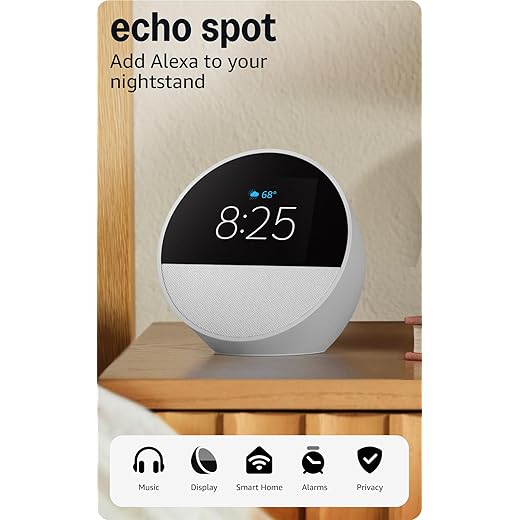
Great for the nightstand. I’m new to Alexa and got this so I can have this on my nightstand with time display and the temperature . Also play my music when cleaning my bedroom and changing the sheets. I’ve used Alexa to turn the heater up or down. Since I’m new to Alexa I know I’m not using it fully since I don’t have smart things around the house, but it’s a start. Setting it up was easy and I went through all of the Alexa app settings to get familiar with it. The voice control is nice with no issues. The sound for my music sounds great and has a 3 band equalizer in the app. The display shows your current weather with the temperature and clouds or rain or shine.Value for the price would depend on how much Alexa functions you use. But I like it all the same even as nightstand alarm clock with Alexa.
The Wonderful Echo Spot. This is a great device, the first time we’ve added to our Alexa collection around the house in years. It replaced a small digital clock on the counter in the master bath at the house… and what a difference! Much better clock, more elegant and easier to read, and the device provides the date, and capable of providing much more than that. But just out of the box, great!Unlike the clock it replaced, this does require an AC outlet, which we knew from what Amazon was showing in the description. But this is well worth giving up one outlet on the counter in the bath.Sound quality is good if not great for the size, and more than adequate to upgrade the master bath and open up music, news, timers, digital books we enjoy from audible (an Amazon company), etc. Super. Everything is hands free, which is great when your hands are wet in the bath or kitchen, etc. And setup really was a breeze, for users like us who already have Alexa devices in the house. Right out of the box, it found our WiFi (with an impossible password) and didn’t need any help from us hooking right up to our WiFi automatically and we were good to go!Finally, the price was right! These devices are priced very reasonably on Amazon, with no middle man, so to speak.Highly recommended. Enjoy!
A great addition to my Alexa home setup with better voice response and a great photo display. This is my second Echo Show. The first one, which I inherited from my mother-in-law, is in the kitchen where it rotates through family photos. I added this newest Echo Show 5 to my great room, and it has quickly become one of my favorite devices with a good value for the price. I keep it on the end table next to my chair so I can glance over and enjoy old family photos as they rotate through. It is also very convenient for checking my outdoor Blink cameras when the dogs start barking, since the camera feed loads faster than getting my phone out.I have been using it for about a week, and setup was incredibly smooth. Because it was added to my existing Alexa household, everything came with settings for my account. It connected right away, and the whole process took only a few minutes. The device has a solid weight, and the speaker quality is very good for listening to music in the background.Day to day, it responds quickly to voice commands and the screen is crisp. I did reduce the brightness a bit from the default, but that was more of a personal preference than a flaw. I have not found anything to be concerned about with this model. In fact, Alexa + seems to understand my questions more accurately compared to previous version, with fewer misunderstandings.This is a great device if you enjoy seeing your photos, listening to music, or checking camera feeds easily. It fits naturally into my smart home setup and has become something I use regularly.
A great addition to my Alexa home setup with better voice response and a great photo display. This is my second Echo Show. The first one, which I inherited from my mother-in-law, is in the kitchen where it rotates through family photos. I added this newest Echo Show 5 to my great room, and it has quickly become one of my favorite devices with a good value for the price. I keep it on the end table next to my chair so I can glance over and enjoy old family photos as they rotate through. It is also very convenient for checking my outdoor Blink cameras when the dogs start barking, since the camera feed loads faster than getting my phone out.I have been using it for about a week, and setup was incredibly smooth. Because it was added to my existing Alexa household, everything came with settings for my account. It connected right away, and the whole process took only a few minutes. The device has a solid weight, and the speaker quality is very good for listening to music in the background.Day to day, it responds quickly to voice commands and the screen is crisp. I did reduce the brightness a bit from the default, but that was more of a personal preference than a flaw. I have not found anything to be concerned about with this model. In fact, Alexa + seems to understand my questions more accurately compared to previous version, with fewer misunderstandings.This is a great device if you enjoy seeing your photos, listening to music, or checking camera feeds easily. It fits naturally into my smart home setup and has become something I use regularly.
Eco spot, eco dot, eco ball. Love all 3. Love the look. I bought the base for an extra USB PORT. Has a nice sound. Now I have 3 different ecos so I can walk around the apt n still hear music while doing house chores. Time, temperature, on face in of item. Voice line shows when she’s listening.Also shows what song is playing by who. Love it. Happy purchase n easy set up.
Great sound and very useful display. The Echo Show works great and has very good sound quality for its size. The screen is clear and responsive, making it easy to use for video calls, music, recipes, and smart home controls. Alexa responds quickly and the setup was very simple. I use it daily and it has been very convenient. Definitely a great addition to the home.
Great sound and very useful display. The Echo Show works great and has very good sound quality for its size. The screen is clear and responsive, making it easy to use for video calls, music, recipes, and smart home controls. Alexa responds quickly and the setup was very simple. I use it daily and it has been very convenient. Definitely a great addition to the home.